Help us learn about your current experience with the documentation. Take the survey.
Git file blame
- Tier: 免费版、高级版、旗舰版
- Offering: GitLab.com、GitLab 自托管版、GitLab 专属版
Git blame 提供了文件中每一行的更多信息, 包括最后修改时间、作者和 commit hash。
查看文件的 blame 信息
前提条件:
- 文件类型必须是基于文本的。GitLab UI 不会显示二进制文件的
git blame结果。
要查看文件的 blame 信息:
- 在左侧边栏,选择 Search or go to 并找到您的项目。
- 选择 Code > Repository。
- 选择您要查看的文件。
- 您可以:
- 要更改当前文件的视图,请在文件标题中选择 Blame。
- 要打开完整的 blame 页面,请在右上角选择 Blame。
- 跳转到您想查看的行。
当您选择 Blame 时,会显示以下信息:
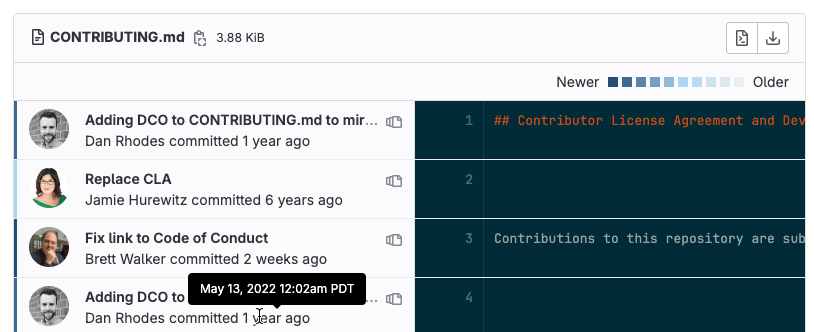
要查看提交的精确日期和时间,请将鼠标悬停在日期上。用户头像左侧的垂直条显示了提交的大致时间。最新的提交显示为深蓝色条。随着提交时间的增长,条形颜色会变为浅灰色。
查看 Blame 之前的提交
要查看特定行的早期版本:
- 在左侧边栏,选择 Search or go to 并找到您的项目。
- 选择 Code > Repository。
- 选择您要查看的文件。
- 在右上角选择 Blame,然后跳转到您想查看的行。
- 选择 View blame prior to this change ( ) 直到找到您感兴趣更改为止。
忽略特定版本
要配置 Git blame 以忽略特定版本:
-
在您的仓库根目录中,创建一个
.git-blame-ignore-revs文件。 -
添加您要忽略的 commit hash,每行一个。 例如:
a24cb33c0e1390b0719e9d9a4a4fc0e4a3a069cc 676c1c7e8b9e2c9c93e4d5266c6f3a50ad602a4c -
在 blame 视图中打开一个文件。
-
选择 Blame preferences 下拉列表。
-
选择 Ignore specific revisions。
Blame 视图会刷新并跳过 .git-blame-ignore-revs 文件中指定的版本,
转而显示之前的有效更改。